
Viewport
The viewport is the part of the tibia window that displays your character, the surrounding tiles and their contents, such as monsters and items. It's the extent of what you can see. You can't see an equal distance in every direction; the viewport is 15x11, with your character in the center of it.
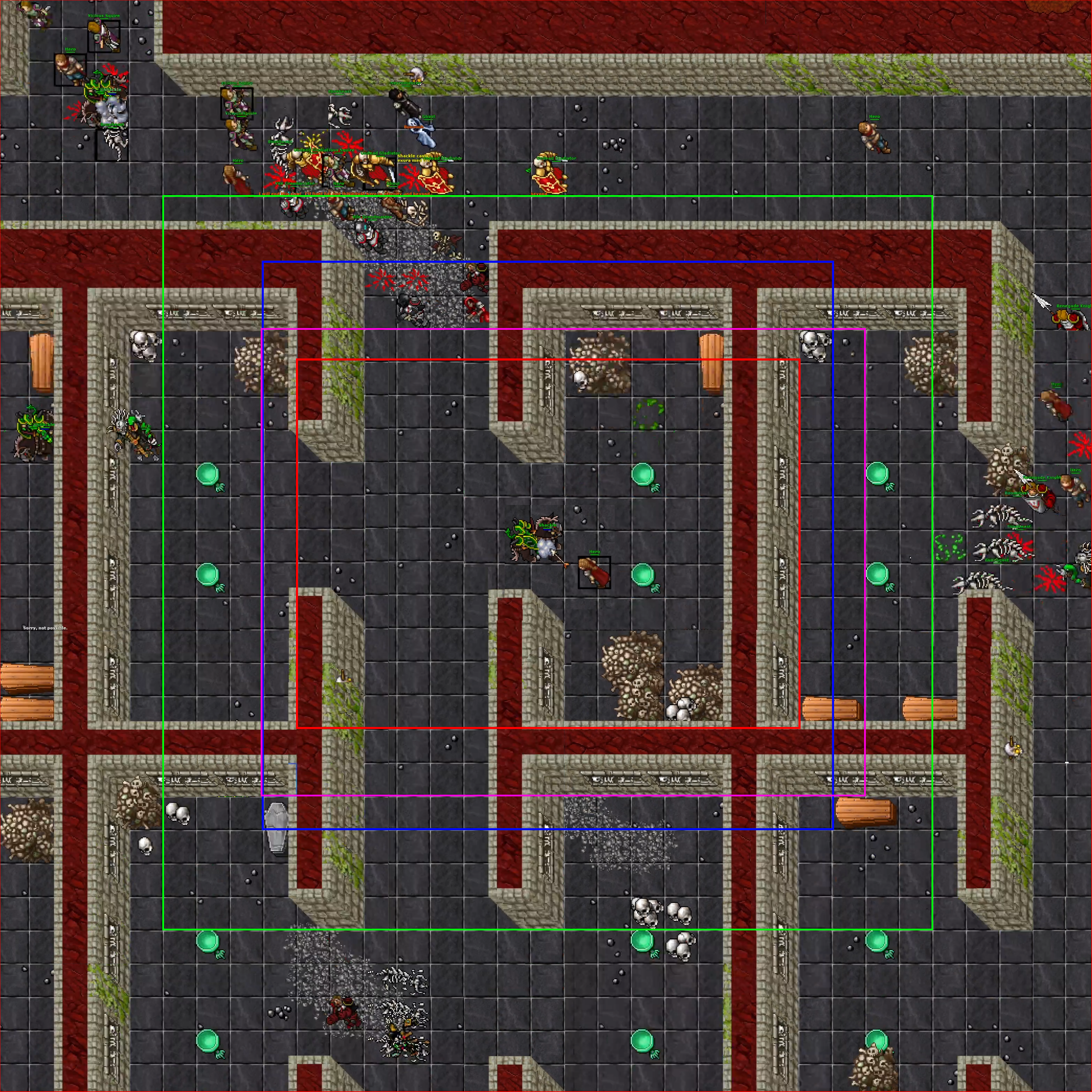
The red rectangle is your viewport. It extends 5 squares to your north and south and 7 to your west and east. Within the red rectangle is what you able to see at a given time. This includes the tops of tall monster's heads from just to the east and south of your viewport. In other words these squares are known to the client but not displayed. If you suddenly disconnected and attempted to move before the client realized you were disconnected, you could see these squares without actually moving.
The violet rectangle is the render distance. It extends 9 squares to your east, 7 to your south, 8 to your west, and 6 to your north. Or 2 squares beyond the viewport to the east and south and 1 square beyond to the north and west. Light emanating from this rectangle are shown and sounds originating from within this rectangle are played. Graphics are also rendered within this range, and this asymmetry is due to the oblique projection (as described in the page on tiles), such that tall trees and monsters overhang their square to the top and left, so more space is rendered to the south and east to accommodate that.
Within the blue square, monsters can target you. it extends 8 squares in all directions from you. According to tests, trapped monsters turn to face a target that approaches within this radius. In practice this means monsters south and north can see you long before you can see them, which should be taken into account when luring.
Within the green rectangle, monsters will begin wandering. It extends 11 squares in all directions from you, except north where it extends only 10. Since wandering monsters move to available non diagonal squares randomly, monsters within the green rectangle can sometimes wander into the blue rectangle, which makes them target the player. They may also wander outside the green rectangle, which (if no longer inside someone else's green rectangle) will make them stop wandering. According to tests, it extends at least 7 floors up and down, likely it extends all the way from top to bottom of the world map from your location. This does not account for the oblique projection as described in the page on tiles. This game mechanic can lead to unexpected results. Players staying in the same location for a long time will eventually cause all monsters who can to wander outside the bounds of their green rectangle on other floors. Another player visiting an area above or below may find rooms mysteriously empty of monsters and nearby areas where the monsters are densely packed for no known reason.
Interaction
The viewport can be interacted with in several ways. Left clicking on an accessible area will cause your character to attempt to walk there. If the square is open but inaccessible, you will receive a bottom message saying "There is no way.". If the square is obstructed or on a different floor, you will receive a message saying "Sorry, not possible."
Items and terrain can be used and looked at.
Monsters can be attacked.
Corpses can be auto looted.
Any square can have a menu opened, which gives options for all of the above, and additionally things like Browse Field (see tile for more), Report Coordinate, and options concerning yourself or party members.
Lighting
Items, monsters, fields, and terrain can radiate light. If a light source is within the violet rectangle, you can see the glow from the light. All light sources produce a round glow when unobstructed, but it spreads according to the same rules as line of sight.
Special Effects
Attacks, terrain, and using items can produce what we'll call special effects. For example, when a dragon breaths fire, or a player shoots an avalanche, the little animation that happens on each of the effect squares is a special effect. These are rendered on top of most other graphics and can make it difficult to tell what's going on in chaotic situations.